
LinkedIn & work

    Corporate headshots for the whole team, no photo day

    Everyone uploads one selfie and comes out in the same style and background. Your team page finally looks like one company.

    $0.99 for 5 photos · private · 14-day satisfaction guarantee

    Original photo: a man in a white t-shirt against a gray wallBefore
    AI example made from that photo: the same man in a charcoal suit in an officeExample
    Example made with Headshotsly from the photo on the left

    Ten people, ten different photos

    Look at most team pages: one studio portrait, two phone selfies, a cropped holiday photo, someone in front of a kitchen cabinet and a gray silhouette for the new hire. It makes a good company look disorganized.

    A photo day fixes it once, until the next person joins. With one selfie each, everyone gets the same outfit style, background and light, and a new hire can match the set on their first day.

    What each person gets

    The same choices for everyone, so the whole team can pick one look and stick to it.

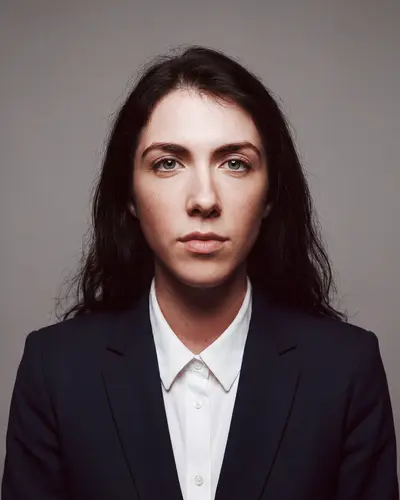
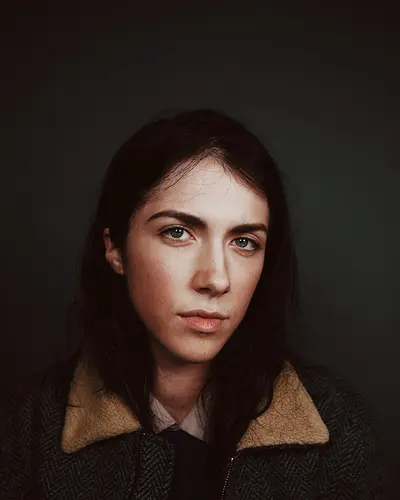
    AI example made from that photo: the same woman in a black suit on a gray backgroundExampleOriginal photo: a woman with dark hair in a jacket with a fleece collarBefore

    Headshots

    A clean headshot for the team page, the directory, LinkedIn and email signatures.

    Outfits

    • Navy Suit
    • Charcoal Suit
    • Blazer
    • Smart Casual
    • Sweater

    Backgrounds

    • Clean Gray
    • Pure White
    • Light Blue
    • Modern Office
    • City Street

    Marketing Shots

    Photos at work for the About page, hiring posts and talks.

    • At Your Desk
    • Client Meeting
    • Team Meeting
    • Speaking on Stage

    1 credit = 1 photo, headshot or marketing shot. Made from your face, not a stock model.

    How to make the whole team match

    Matching photos come from a few fixed choices. Decide them once, write them down, and share them with everyone.

    • One background for everyone: a light gray studio is the safest choice.
    • One dress level: all suits, all blazers without a tie, or all smart casual.
    • The same framing: head and shoulders, face centered.
    • Everyone uploads a clear, recent selfie in daylight, facing the camera.
    • Keep the choices written down, so new hires can match later.

    Where office photos get used

    Once everyone has one, the same photo turns up in more places than you'd think. That's why it's worth getting it consistent once.

    • The team or About page on your website
    • The company directory and chat profile pictures
    • Email signatures
    • Sales decks, proposals and speaker bios
    • LinkedIn, so people recognize the same face everywhere

    New hires, promotions and people who hate photo days

    Photo days miss people: someone is sick, someone works remotely, someone joins next month. Then the team page is out of date again.

    With one selfie, anyone can get their photo on their own time, from anywhere, in the same style as everyone else. Updating after a new haircut is just one more selfie.

    Different jobs, same office

    Some teams mix roles: a law firm with office staff, a brokerage with agents and admins, a clinic with doctors and front desk. You can keep one background for everyone and let each person pick the outfit that fits their job.

    Straight answer

    Everyone checks their own photo first

    Each photo is made from that person's own selfie and keeps their face as it is. Nobody gets a face they don't recognize.

    Everyone can see their result before it goes on the website, and photos are private and can be deleted any time.

    For your company

    Invite the whole team with one link

    With a team account, you invite people with a link, they upload a selfie, and you see everyone's photos in one place. Team accounts are a separate plan; see the teams page for how it works.

    How it works

    1. Step 1

      Upload one selfie

      Face a window and look at the camera. Your phone is enough.

    2. Step 2

      Pick a style

      Pick the team's outfit style and background, and use the same for everyone.

    3. Step 3

      Download in 4K

      Your photos are ready in about 2 minutes.

    One simple price

    $0.99

    for 5 photos in 4K. Pay once.

    • No subscription, no monthly bill
    • 1 credit = 1 photo, headshot or marketing shot
    • No watermark on paid photos
    • 14-day satisfaction guarantee

    Your photos stay private

    Not sure yet? Make one photo free first. How the free photo works

    Questions people ask

    Start with your own photo

    Try the style on yourself first. If it looks right, bring the rest of the team.